
• LATEST
  • NEWS
  • READ
  • WATCH
No Result
View All Result
  • Comics
  • Gadgets
  • Games
  • Geeks
  • Movies
  • Music
  • TV
  • DC
  • Marvel
  • Call of Duty
Videos
Support Us
  • Comics
  • Gadgets
  • Games
  • Geeks
  • Movies
  • Music
  • TV
  • DC
  • Marvel
  • Call of Duty
No Result
View All Result
No Result
View All Result
  • Wowkia Comics
  • Wowkia Games
  • Wowkia Movies
  • Wowkia TV
  • DCEU
  • MCU
  • Android
  • PC
  • PS4
  • Xbox One
  • Anime
  • Playstation
  • Marvel
  • DC

How to Change Club Name in FIFA 22

by Dan
4 years ago
in Games, Game Guide
A A
How To Change Club Name In Fifa 22

How to Change Club Name in FIFA 22 - Goal.com

ShareTweetSendShare

If you want to create your Club name in a game made by Electronic Arts, namely FIFA 22, there is a way. More precisely, this step can be referred to as change the club name in FIFA 22, giving you the right to change the name of the club you chose earlier.

So, here Wowkia will only tell you how to change the club’s name you have chosen. In fact, in this feature, you can also create abbreviations for your club. This abbreviation will later be seen in the match.

Apart from that, if you already understand our discussion this time, here’s how to change it. This feature can be used in various platforms, such as PC, PlayStation, Xbox, etc. So, this guide does not focus on one platform only.

Change Club Name in FIFA 22

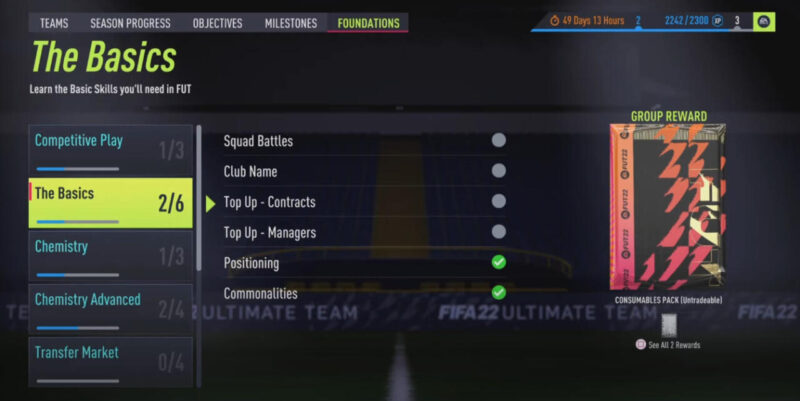
First of all, you need to open FIFA 22 first. After that, later in the game’s main menu, you will see the Ultimate Team menu, and you need to open it. After that, in Ultimate Team, you will see various tabs and just open Foundations, as shown in the photo below.

FIFA 22 Club – Captainconor

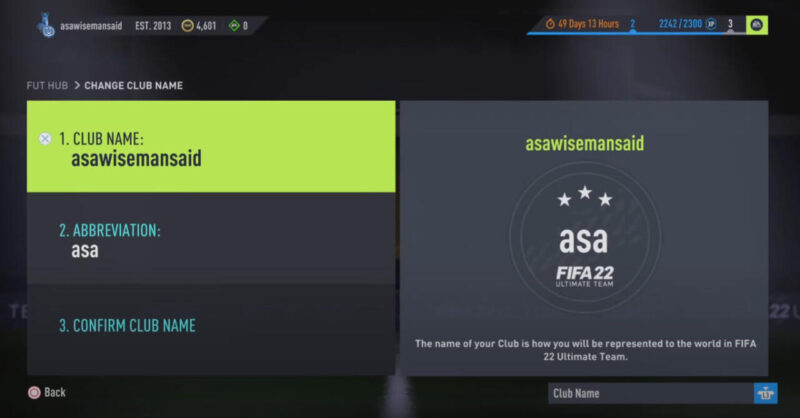
If so, go to The Basics tab and select Club Name. Later, you can change the club’s name as you wish; for example, you will only see random words in the photo. In addition to changing the club name, as I said earlier, you can also create an abbreviation for the club here.

Club Name – Captainconor

After filling in the club name as you want, now you need to save it. If you have, then you have successfully changed your club name in FIFA 22. If you need another guide regarding this game, don’t forget to say it in the comments column.

Tags: Electronic ArtsFIFAFIFA 22
ShareTweetSendShare
Previous Post

WoW TBC – Getting Started with The Fury Warrior

Next Post

Grand Theft Auto Trilogy Will be Expensive Rumors Appear

Dan

we live in a society with pain.

Related Posts

Game News

PS Plus Free Games Players Want for Release January 2021

5 years ago
0
Games

Harvest Moon Is Finally Available for Mobile, Tencent and Marvelous Brought it to Us!

7 years ago
1
How-to

Here’s How to Download TikTok Song Easily!

5 years ago
0
Games

How to Get Queen Bee in Valheim

5 years ago
5
Games

How To Get Rid Of Slow Gaming PC With In-Game Settings

6 years ago
2
Game News

Despite German’s Ban, Gamescom 2020 Will Still Be Held in Some Fashion

6 years ago
0
Load More

Leave a Reply Cancel reply

Your email address will not be published. Required fields are marked *

MOST POPULAR

500+ Free eFootball PES Accounts (2025)

12 months ago
746

500+ Free 8 Ball Pool Accounts with Coins (2025)

12 months ago
165

500+ Free Car Parking Multiplayer Accounts with Rare Car Designs (2025)

12 months ago
885

The Sims 2 Cheats for PC, PS2 and Xbox

11 months ago
6

Sonic Origins Cheats: Level select menu, debug mode and more

11 months ago
10

LEGO Jurassic World Cheats

11 months ago
9

© 2025 Wowkia Media All Right Reserved

Navigate Site

  • About Us
  • Contact us
  • Privacy
  • Terms

Follow Us

  • Login
No Result
View All Result
  • Comics
  • Gadgets
  • Games
  • Geeks
  • Movies
  • Music
  • TV
  • DC
  • Marvel
  • Call of Duty

© 2025 Wowkia Media All Right Reserved

Exit mobile version