



As you know, TikTok is currently a trendy application in all countries in the world. Why? Of course, because the application is a unique and entertaining place to share videos.
However, even though TikTok is a very popular application in the world, many still do not fond of this application because it is made in China, it still has strange contents and others. Not enough with the insult, it turns out that TikTok has also been blocked in various big countries, such as the United States, India, and others.
Download TikTok Videos Without Watermarks
Speaking of TikTok, do you know how to download videos on TikTok without a watermark? If you don’t know, it just so happens that Wowkia wants to share how to download TikTok videos without a watermark. If you are curious about how to do it, follow the explanation below!
For additional information, you can do this method on various devices! Starting from computers, laptops, smartphones, tablets, and others!
Total Time: 5 minutes
Open TikTok Application
First, open TikTok application on your smartphone and look for the TikTok video that you want to download without a watermark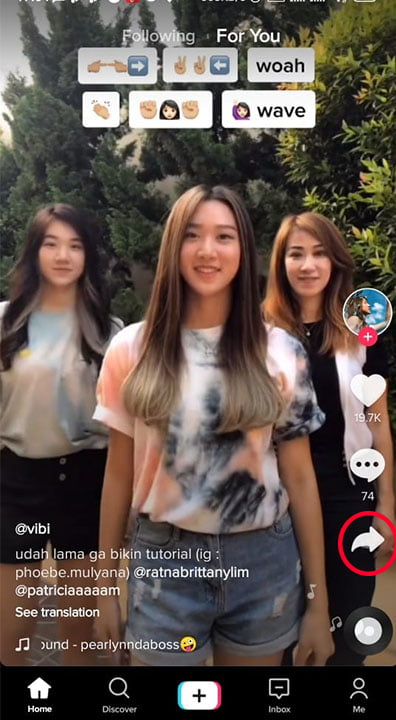
Copy the TikTok Videos Link
Now, if you have got the video that you want to download without a watermark, click Share and Copy Link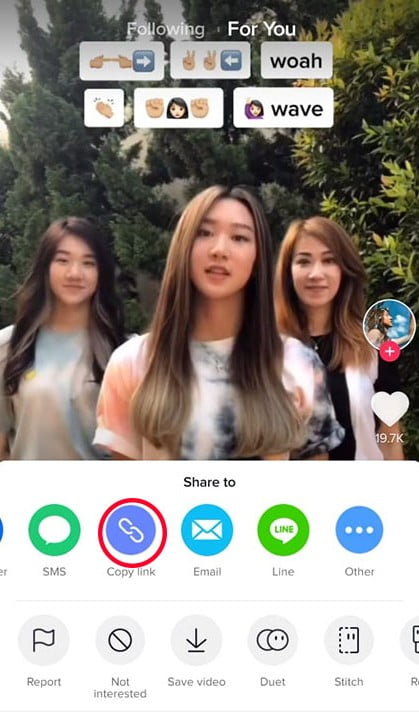
Open the TTDownloader Website
After you finish copying the video link that you want to download the TikTok video without watermark, open the TTDownloader website in your web browsers, such as Google Chrome, Firefox, and others.
Paste the Link to TTDownloader
If you have entered the TTDownloader website, paste the TikTok video link that you copied but into the column provided and click Get Video.
Download Video No Watermark
So, because in this article Wowkia wants to tell you how to download TikTok videos without a watermark, download the video that says “No Watermark”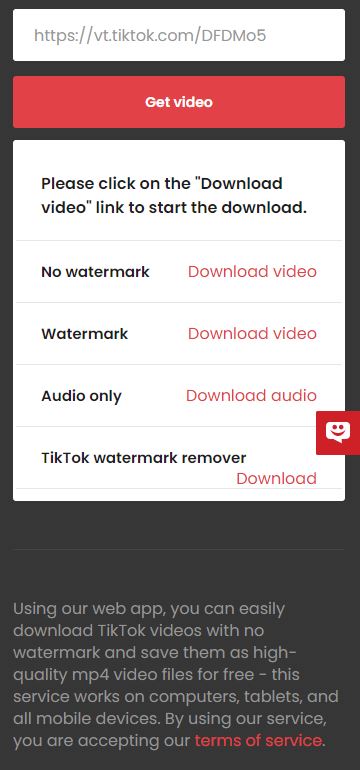
Done
Once the download process finished, try opening it. Has the watermark disappeared? If so, congratulations on completing how to download TikTok videos without a watermark!
So, what do you think of this article on how to download TikTok videos without a watermark, it’s really easy? If so, don’t forget to say it through the comments column provided!